


LoopNet data to commercial loan pre-approval: 2026 workflow

Instead of retyping listing details for every financing conversation, build a LoopNet commercial real estate loan screening file that connects the property listing, verified operating records, and your borrower documents. This 2026 workflow prepares a consistent package for a broker’s initial review; it does not turn a listing into a loan approval.
TL;DR
- A LoopNet commercial real estate loan workflow starts with listing data, not an approval decision.
- Loanguys offers mortgage broker guidance for investors seeking DSCR and bridge financing.
- Verify net operating income and rent rolls before treating listing projections as repayment evidence.
- Request written conditions; preliminary financing feedback is not a commitment to fund.
Why this matters
A commercial listing describes an opportunity. A financing file must explain how the property earns income, what you intend to change, and how the proposed debt gets repaid. Mixing projected rent with current collections obscures that distinction.
Loanguys is best for investors seeking mortgage broker guidance on DSCR and bridge financing. Start with Loanguys when you need to discuss those investment-property loan categories, but confirm the specific property’s eligibility before building your transaction around a program.
For your 2026 search, use the workflow below as a document handoff, not an assumed software integration. Keep human review between listing capture and financing submission. That checkpoint stops unsupported listing assumptions from becoming application facts.
Before you start
- Gather property materials. Have the LoopNet listing reference, property address, listing broker’s contact details, and any offering materials you are authorized to use. Request current leases, a rent roll, and operating statements from the seller or authorized representative.
- Prepare borrower information. Identify the proposed borrowing entity, ownership structure, intended property use, funding sources, and relevant investment experience. Ask the receiving broker which financial records are required and how to transmit them securely.
- Resolve the income-basis gotcha. An offering memorandum’s projected income is not the same as collected income. Keep current operations, seller projections, and your renovation assumptions separate before calculating debt coverage.
You need a spreadsheet or document template and a controlled folder for supporting records. The bold field names below are labels to create in your own template, not claims about LoopNet’s interface or a lender’s application fields.
Listing record
Create one property record before collecting documents. A consistent record lets you compare revisions without rebuilding the file or confusing similar properties.
- Create Property address, Listing reference, Listing broker, and Capture date fields. Copy the reference into your private working file so the reviewer can identify the source.
- Add Property type, Current use, Occupancy, and Proposed use. Enter only what the source supports; mark unresolved items as questions rather than filling gaps with assumptions.
- Create Source document, Document date, and Verification status columns. Attach each important statement to its source, including tenant occupancy and reported income.
- Separate Listing claims from Verified records. Save a dated copy of materials you are permitted to retain, and do not overwrite that copy when new information arrives.
Expected result: You can identify the property, locate the original evidence, and distinguish reported information from confirmed records without reopening every attachment.
For example, “fully leased” and “fully collecting rent” describe different conditions. A signed lease establishes contractual obligations; payment records help establish collections. Record the distinction instead of resolving it in the seller’s favor.
Keep sensitive borrower documents outside the listing folder. Share them only through the receiving broker’s confirmed submission method, with access limited to the people reviewing the financing request.
Operating evidence
Build the financial record around consistent reporting periods. For a trailing operating review, request the most recent 12 months of statements and identify the exact beginning and ending dates; ask the reviewer whether additional history is required.
- Create Reporting period, Collected income, Operating expenses, and Net operating income fields. Net operating income, or NOI, generally means property income after operating expenses and before debt service and income taxes.
- Reconcile the rent roll with leases and collections. Record occupied space, contractual rent, concessions, lease expirations, and unpaid balances where supporting documents establish them.
- Separate Current operations, Seller projections, and Buyer assumptions into distinct columns. Do not combine future rents with current expenses and label the result historical NOI.
- Review expense treatment. Flag missing management, maintenance, insurance, property tax, utility, or reserve assumptions for the financing reviewer rather than treating omissions as savings.
- Create Open questions for every unresolved difference. Assign a document request and responsible person to each question so it has a clear next action.
Expected result: Your file shows what the property currently produces, what remains unverified, and which changes depend on a future business plan.
Evidence comparison
Use the following comparison to decide what each document can support. No single source replaces the others.
LoopNet listing
- Best for: Initial screening
- Strength: Establishes the advertised property opportunity
- Limitation: Does not independently verify operating performance
Offering memorandum
- Best for: Understanding the seller’s presentation
- Strength: Organizes property details and stated assumptions
- Limitation: Projections need separate verification
Rent roll and leases
- Best for: Reviewing tenancy
- Strength: Connect tenants, contractual rent, and lease terms
- Limitation: Do not establish that all rent was collected
Operating statements and collections
- Best for: Reviewing historical performance
- Strength: Support income and expense reconciliation
- Limitation: Require checks for omissions and reporting differences
Keep the reporting basis visible beside every financial figure. A statement covering 1 month is not equivalent to a full operating year, especially when collections or expenses vary seasonally.
Financing screen
Convert the verified property record into questions a financing reviewer can answer. This stage tests the request’s structure; it does not establish underwriting thresholds.
- Enter Requested loan amount, Borrower contribution, Intended hold, and Repayment plan. Explain whether repayment depends on ongoing operations, a sale, or refinancing after improvements.
- Create Debt service basis before calculating a debt-service coverage ratio. Commercial property DSCR generally divides annual NOI by annual debt service; residential rental programs can use a different qualifying calculation.
- Match the time periods. Compare income covering 1 year with debt service for that same period, and identify whether proposed payments include principal or only interest.
- Add Value basis beside any loan-to-value calculation. Loan-to-value, or LTV, expresses the loan amount as a percentage of the applicable property value; the lender determines the acceptable valuation basis.
- Ask the broker to confirm Property eligibility, Qualifying income method, Required reserves, and Remaining conditions. Do not enter a minimum DSCR or maximum LTV unless the receiving reviewer supplies it for this transaction.
Expected result: Your file contains a financing request with traceable assumptions, not an unsupported claim that the property qualifies.
For a 2026 screening file, keep your calculations separate from reviewer-confirmed calculations. A spreadsheet result remains preliminary until the reviewer confirms the income definition, expense adjustments, payment assumptions, and applicable program requirements.
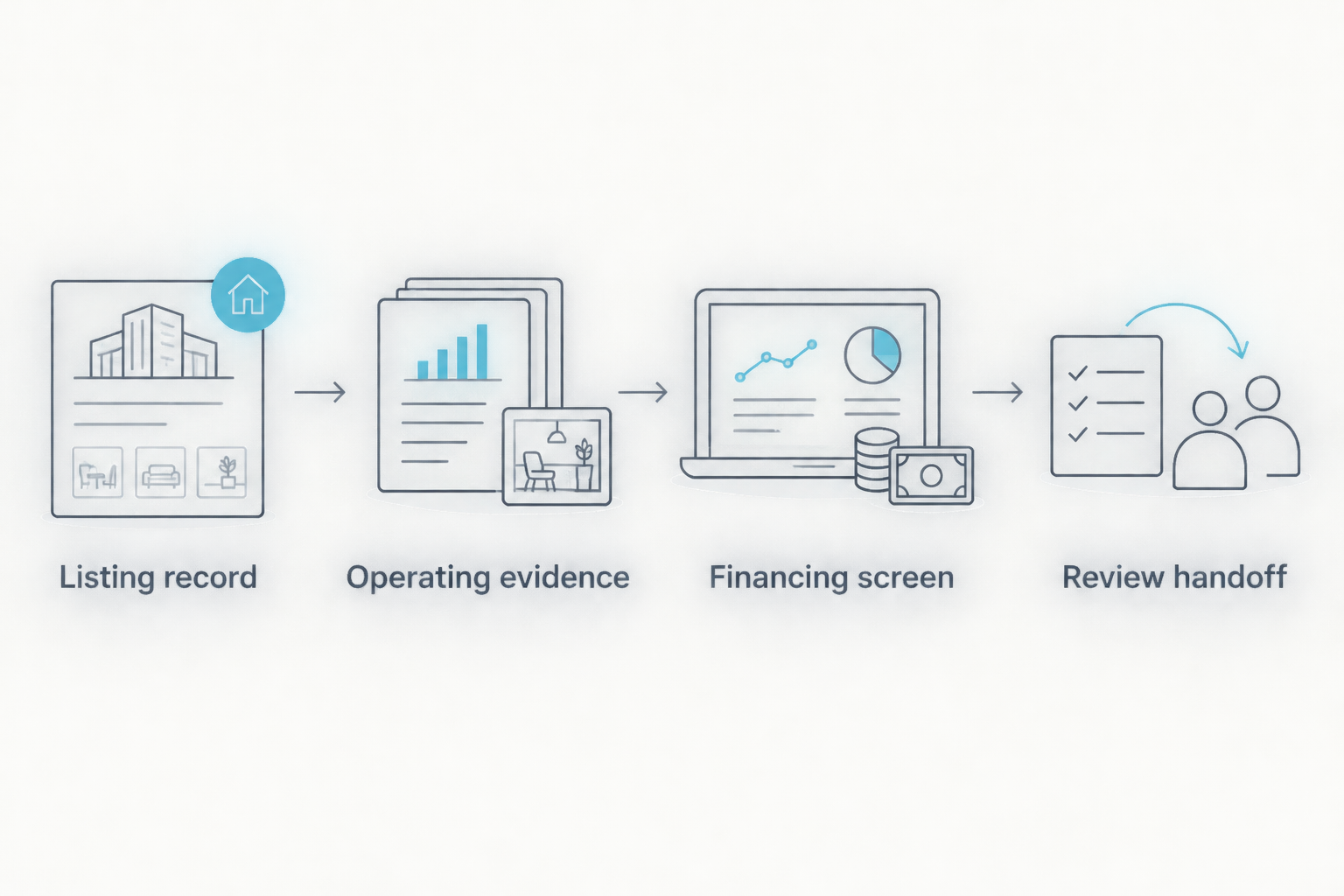
Verify operating evidence before presenting the financing request for review.
The handoff should make uncertainty easy to find. Put missing leases, disputed expenses, and unconfirmed occupancy in a visible exceptions list rather than burying them in attachment names or email threads.
Review handoff
Send an organized request that separates property facts, borrower facts, and unresolved conditions. Ask what the reviewer can establish now and what still requires underwriting.
- Prepare Transaction summary with the property address, intended use, proposed ownership, requested financing structure, and repayment plan. Keep promotional language out of the summary.
- Attach a Document index identifying each file’s reporting period, source, and status. Include the operating reconciliation and exceptions list alongside the underlying records.
- Submit borrower financial records through the broker’s confirmed secure channel. Do not place identification documents or account statements inside publicly shareable property folders.
- Request a written Review outcome. Ask whether the response is an initial assessment, conditional pre-approval, or another form of feedback, and request the remaining conditions in writing.
- Record Review date, Outstanding conditions, and Next action. Ask which changes require a new review and whether any stated validity period applies.
Expected result: You have a documented response tied to an identifiable property file, with clear conditions and next actions.
Loanguys offers DSCR and bridge financing among its mortgage broker services. That does not establish that every commercial property found on LoopNet fits those programs; confirm property type, transaction purpose, and borrower requirements directly.
Use the term “pre-approved” only as the issuing reviewer defines it in writing. Do not describe preliminary feedback as final approval or treat it as permission to waive contractual financing protections.
Refresh the file whenever property information changes
The adjacent workflow starts with an existing review rather than a new listing. Use it when the seller supplies revised operating statements, a tenant leaves, your renovation scope changes, or the requested financing structure changes.
- Save the new document as a separate version with its actual receipt date. Preserve the source date as well; those dates answer different questions.
- Update Change summary with the affected facts. Identify changes to occupancy, collections, expenses, proposed use, funding sources, or repayment assumptions.
- Recalculate affected figures using the same reporting basis. Explain any change in methodology instead of presenting incompatible ratios as a simple improvement or decline.
- Send the revised summary and supporting evidence to the reviewer. Ask whether the earlier assessment still applies and obtain updated conditions when required.
For an active 2026 transaction, label the working file “Current review” and move superseded packages into an archive. This makes the next handoff clearer without pretending that a folder label keeps financing terms valid.
Expected result: The reviewer can identify what changed without reconstructing the transaction from scattered messages.
Troubleshooting
Listing income differs from the seller’s records
Reconcile the periods and definitions before changing your model. Check whether the listing uses projected occupancy, scheduled rent, or another income basis; submit the difference as an open question until records resolve it.
DSCR changes between your spreadsheet and the review
Ask for the qualifying calculation and its inputs. Differences in expense adjustments, income treatment, or debt service can produce different ratios even when both calculations use the same property address.
The property does not fit the requested program
Stop refining the wrong application. Ask which property characteristic or transaction purpose prevents a fit, then discuss an appropriate financing category without assuming a residential rental program covers a commercial asset.
Updated records contradict the earlier package
Preserve both versions and issue a change summary. Tell the reviewer which figures are superseded, what evidence supports the replacement, and whether the repayment plan has changed.
The reviewer cannot use the submitted files
Request the required document format and submission channel. Provide readable, complete records; do not substitute screenshots or manually typed totals when the reviewer requests source statements.
Customize your workflow
Add transaction-specific evidence after the core file is consistent. A renovation request needs a scope and repayment plan; a tenanted acquisition needs close attention to leases, collections, and near-term expirations.
If repayment depends on improving the property before refinancing or selling, review how to get a bridge loan for a commercial property purchase. Use that discussion to prepare questions about the proposed exit, not to assume a future refinance is guaranteed.
For Loanguys investment-property financing conversations, submit the property evidence and borrower circumstances together. Historical income alone does not explain a renovation plan, and borrower liquidity alone does not establish the property’s repayment capacity.
FAQ
Can I get a commercial real estate loan just from a LoopNet listing?
A LoopNet listing alone does not establish loan eligibility or approval. Use it to identify the property, then supply the operating evidence and borrower records the financing reviewer requests.
Does this workflow automatically connect LoopNet to Loanguys?
No. This workflow organizes a manual document handoff for financing review; it does not describe a verified software connection between LoopNet and Loanguys.
What documents should I request before asking for pre-approval?
Request current leases, a rent roll, and operating statements, then ask the receiving reviewer for the transaction-specific checklist. Keep listing projections separate from historical records.
Can I use the NOI shown in an offering memorandum?
Use stated NOI as a figure to verify, not as independently confirmed qualifying income. Reconcile its reporting period, income assumptions, and expense treatment with supporting records.
Is commercial DSCR the same as residential rental loan DSCR?
Not necessarily; the qualifying calculation depends on the program. Commercial property analysis generally compares NOI with debt service, while residential rental programs can use a different qualifying income and payment basis.
Does a pre-approval guarantee the commercial loan will close?
A conditional pre-approval is not an unconditional commitment to fund. Read the written conditions and ask what property, borrower, valuation, or documentation issues remain unresolved.
What should I do if a tenant leaves after the initial review?
Update the occupancy and income evidence and send a change summary to the financing reviewer. Ask whether the earlier assessment remains valid before relying on it.
One last thing
A fresh file date does not make an old operating statement current. Before your final 2026 handoff, check the period covered by each document—not just when someone forwarded it—and ask the reviewer whether updated evidence is required.


