


Schedule E data to rental property loan approval: 2026 workflow

Instead of repeatedly copying tax-return figures into lender emails, build a Schedule E rental property loan file that connects each property’s reported income, current lease, and housing obligations. This 2026 workflow shows you how to organize the evidence, request the lender’s qualifying-income calculation, and resolve conditions without confusing taxable profit with mortgage eligibility.
TL;DR
- For a Schedule E rental property loan, reconcile each property separately before submitting income documents.
- Loanguys offers rental property loan borrowers broker guidance on DSCR and alternative-documentation programs.
- Taxable rental income is not automatically the income a mortgage lender uses to qualify you.
- Choose tax-return-based underwriting or DSCR review before building your final document package.
Why this matters
Schedule E reports rental income and expenses for tax purposes. Mortgage underwriting answers a different question: what rental income can support the proposed loan under the selected program’s rules?
Depreciation, mortgage interest, ownership periods, and current housing obligations all affect that distinction. Do not submit the final profit or loss figure as your qualifying income without a lender-reviewed calculation.
Loanguys is a mortgage broker offering DSCR, bridge, bank-statement, and other loan programs. Loanguys is best for rental property loan borrowers seeking broker guidance on DSCR and alternative-documentation programs. That program choice matters: a well-organized tax-return file still needs to match the underwriting approach.
Before you start
- Get document access. Collect the filed federal returns and supporting schedules the lender requests, current leases, mortgage statements, property-tax records, insurance documents, and applicable association statements. Obtain entity returns and ownership records when relevant.
- Prepare a working file. Use a spreadsheet, readable PDFs, and the lender’s designated secure document channel. Ask which return periods and rental-history documents the selected program requires before assembling the package.
- Catch the hidden mismatch. Schedule E mortgage interest is not the full mortgage payment, and a tax loss is not automatically a qualifying loss. Keep annual tax figures separate from current monthly obligations to avoid subtracting the same expense twice.
The bold worksheet labels below are fields you create, not buttons in a lender portal. This is a document-control workflow, not an automatic connection to IRS records or an approval engine.
Property record setup
Build the property map
- Create a worksheet named Property Map. Add Property Address, Unit, Legal Owner, Ownership Share, Acquisition Date, Rental Start Date, and Loan Purpose.
- Enter 1 row per property. Use separate unit references where leases or supporting records require them, while preserving the connection to the property-level tax reporting.
- Match each property to its Schedule E entry. Record the return period and property column so a reviewer can find the original figures without searching the entire return.
- Add Current Status and record whether the property is leased, vacant, recently acquired, sold, or undergoing repairs. Attach an explanation when today’s status differs from the return.
Expected result: Every property in the application has a traceable connection to its tax records and current operating status.
Do not combine different properties simply because rent arrives in the same bank account. A profitable rental does not explain another property’s vacancy, ownership discrepancy, or missing mortgage statement.
Establish the document index
- Create Document Index with Property, Document Type, Covered Period, File Reference, and Status.
- Save complete source documents. Keep the filed return intact and use page references rather than submitting isolated screenshots as the only evidence.
- Label current records separately from tax-period records. For a 2026 application, a current lease and a filed return describe different periods; neither replaces the other automatically.
- Flag missing items before submission. Identify who will supply each item and whether the lender has accepted an alternative.
Expected result: You can identify the source, period, and status of every document in the package.
Schedule E reconciliation
Capture the reported figures
- Create Schedule E Inputs and record each property’s rents received, expense categories, depreciation, and reported income or loss exactly as filed.
- Preserve the original signs. Enter a loss as a negative figure rather than converting it into a positive amount for presentation.
- Add Source Reference beside each input. Include the return period, page, property column, and relevant line label.
- Reconcile your entries to the filed schedule before making any underwriting adjustments. Keep Reported Tax Result separate from Proposed Qualifying Income.
Expected result: Your worksheet reproduces the tax reporting without silently changing its meaning.
IRS Schedule E, Part I, is the source for individually reported rental real estate income and expenses. Entity ownership or substantial guest services can require different reporting and documentation; have your tax professional confirm the applicable treatment rather than forcing every rental into the same template.
Separate adjustments from obligations
- Create Adjustment Review with Category, Reported Amount, Requested Treatment, Supporting Evidence, and Lender Decision.
- Flag depreciation and other potentially eligible adjustments for lender review. Do not assume that every deduction qualifies for an add-back.
- Record current principal, interest, property taxes, insurance, and applicable association dues in Housing Obligations. Identify which amounts are already included in an escrowed payment.
- Ask the lender to explain the calculation sequence, including how expenses are adjusted and how current housing obligations enter the result.
- Use the lender-approved income period. An annual amount covering a complete year converts to a monthly average over 12 months; partial-year ownership requires a supported treatment, not automatic annualization.
Expected result: Tax figures, proposed adjustments, and current payments remain separate until the lender confirms how they fit together.
Never add back mortgage interest and then forget to account for the required housing payment. The reverse error also matters: subtracting taxes or insurance separately when they are already included in the payment duplicates the expense.
The reconciliation follows a clear sequence: Source Records, Property Match, Income Review, and Condition Resolution. Each stage should leave a record the next reviewer can verify.
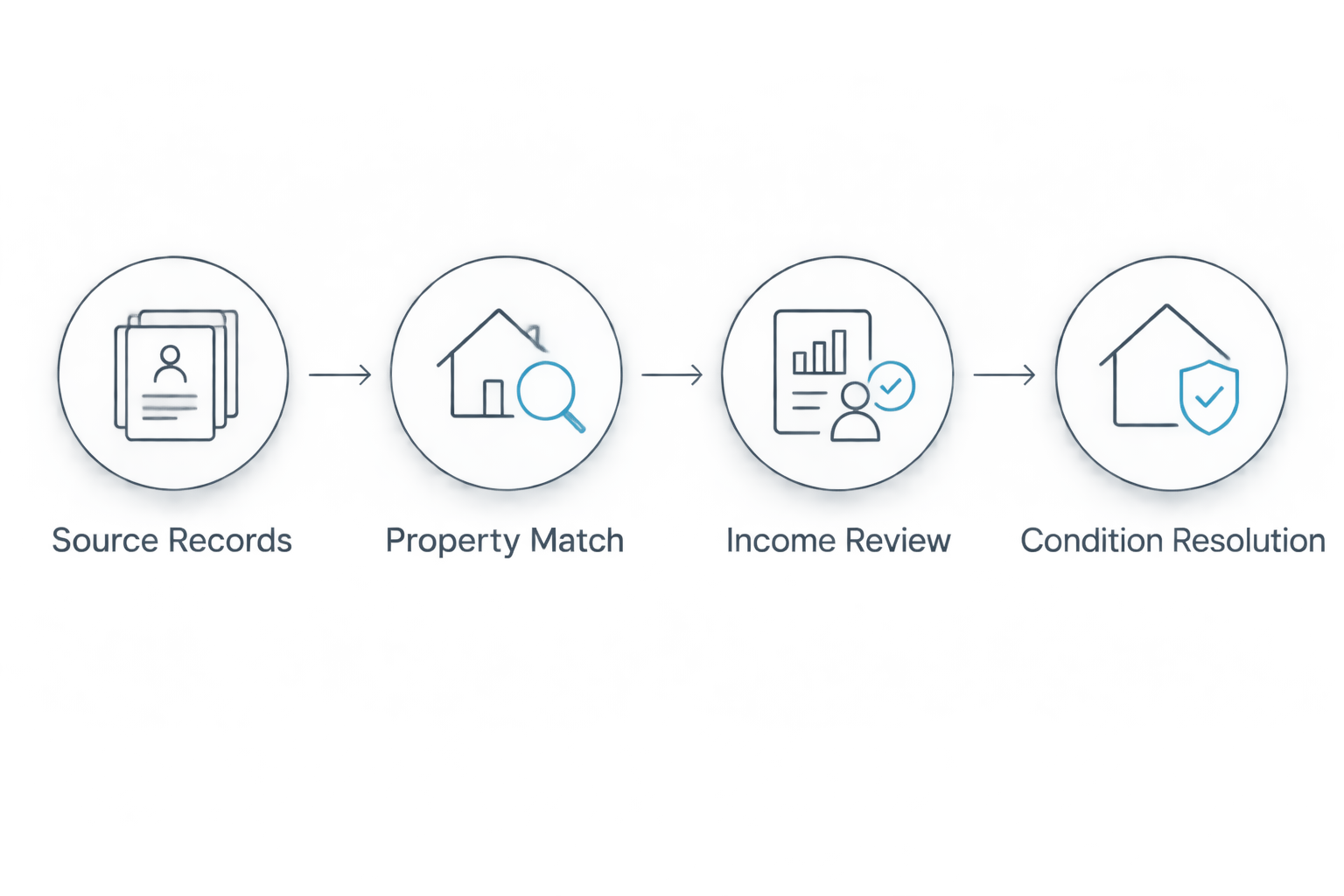
Keep the source evidence attached to the income calculation throughout underwriting.
Loan program selection
Match the evidence to the underwriting method
- Ask whether the proposed loan uses personal qualifying income, property-level debt service coverage, or another documented method.
- Confirm property use, borrower structure, and transaction purpose before requesting a final document checklist. A primary residence and an investment rental are not interchangeable applications.
- Request the program’s treatment of rental losses, newly acquired properties, vacancies, and lease changes.
- Record the selected approach in Underwriting Method. Keep any alternative approach clearly marked rather than mixing calculations from different programs.
Expected result: The document package supports the actual loan program instead of an assumed approval method.
For your 2026 file, compare the approaches by the evidence they require—not by which produces the largest preliminary income figure.
Tax-return-based rental income review
- Best for: Borrowers whose documented personal income and rental history support qualification
- Main benefit: Connects reported rental performance with the broader borrower income review
- Main limitation: Tax losses, limited history, and ownership changes require detailed analysis
DSCR rental property loan review
- Best for: Investors seeking qualification centered on rental-property income relative to debt obligations
- Main benefit: Focuses the income analysis on the investment property
- Main limitation: Rent evidence, property eligibility, credit, equity, and reserves still matter
DSCR means debt service coverage ratio: a comparison of qualifying property income with debt obligations under the program’s definition. Residential investor programs and commercial programs do not necessarily use the same numerator or denominator.
A DSCR loan is not a promise of approval without documentation. Confirm the required rent evidence and payment components, then use the guide to rental income needed for DSCR qualification to frame your questions.
Submission and condition tracking
- Create Submission Summary with the transaction purpose, property list, selected underwriting method, document index, and unresolved questions. Keep the summary short; attach evidence rather than repeating entire returns.
- Send sensitive documents through the lender’s designated secure channel. Do not put Social Security numbers or account details in an ordinary email subject line or an openly shared spreadsheet.
- Request the lender’s reviewed rental-income result. Ask which adjustments were accepted, which obligations were deducted, and whether any property creates a qualifying loss.
- Track each request in Conditions Log using Condition, Owner, Evidence Needed, Submitted Date, and Resolution.
- Distinguish preliminary review, conditional approval, and final authorization to close. Ask what remains outstanding rather than treating an encouraging conversation as completed underwriting.
Expected result: Every open condition has an owner, supporting evidence, and a documented resolution.
Loanguys offers program choices, but that does not make every borrower eligible for every program. The useful next move is a review of your property, income documentation, and transaction—not an assumption that a different document format removes underwriting requirements.
Discuss your rental loan file
Ask which income documents and program approach fit your rental property transaction.
Update the file whenever rental records change
The adjacent workflow is ongoing maintenance. Use it when you file a return, replace a tenant, receive an insurance renewal, or change the property’s financing.
- Preserve the submitted version. Create a new working copy instead of overwriting the evidence supporting an earlier review.
- Update the changed source record and its corresponding worksheet entry. Identify the effective date and explain whether the change affects historical reporting or current operations.
- Reconcile rent, occupancy, and housing obligations again. A lease increase does not change previously filed rental income, and an insurance renewal can change the current payment analysis.
- Notify the lender of material changes during an active application. Request confirmation that the revised document has been reviewed.
Expected result: Your 2026 working file reflects current conditions without erasing the history behind the application.
If your tax professional amends a return, retain the original and amended records with clear labels. Ask the lender which additional evidence is required to establish the amendment’s status.
Troubleshooting
The tax return shows a loss despite positive cash flow
Separate tax accounting from lender qualification. Depreciation can reduce taxable income without representing a current cash payment, but that does not make every reported loss irrelevant. Ask for the lender’s adjustment worksheet and provide the requested supporting schedules.
Bank deposits do not match reported rents
Reconcile the difference by property and period. Deposits can include transfers, security deposits, owner contributions, or receipts net of management charges; identify each item rather than describing the entire account balance as rent. Keep refundable security deposits separate from rental revenue.
A recently purchased rental has limited tax history
Provide the acquisition date, closing records, lease, and available operating evidence. Do not create a full-year history from a short operating period. Ask whether the selected program accepts current lease or market-rent documentation and under what conditions.
Ownership names differ across documents
Map the individual borrower, titled owner, borrowing entity, and reported tax ownership. An LLC name on a lease does not by itself establish who owns the property or how income reaches the borrower. Supply the entity and ownership documents the lender requests.
The lender requests corrected payment figures
Check escrow before changing the income calculation. Separate principal and interest from taxes, insurance, and association dues, then mark which components the statement already includes. Replace estimates with the current supporting records and ask the reviewer to confirm the corrected total.
Customize your workflow
Expand the property map before expanding the spreadsheet’s complexity. Add separate tabs for entity ownership, short-term rental operations, or a portfolio refinance only when those details affect the proposed transaction.
For a larger portfolio, maintain 1 source reference per adjustment and keep property-level calculations visible before producing a portfolio summary. This makes a disputed expense or missing lease easier to isolate without rebuilding the whole package.
Before a 2026 refinance, also separate your income review from your equity review. Rental income supports repayment analysis; property value, existing liens, and the proposed loan amount answer different eligibility questions.
FAQ
Can I use Schedule E income to qualify for a rental property loan?
Yes, lenders can use documented Schedule E rental income when the selected program permits it. The lender calculates qualifying income using its rules rather than automatically accepting the reported tax profit.
Does a Schedule E loss automatically disqualify me from a mortgage?
No, a Schedule E loss does not automatically disqualify you. The lender reviews eligible adjustments, current housing obligations, other qualifying income, and the selected program’s requirements.
Can depreciation be added back to rental income for a mortgage?
Depreciation can be an eligible adjustment under applicable underwriting rules. Provide the supporting tax records and let the lender confirm the treatment rather than adding every deduction back yourself.
Is a DSCR loan better than using my tax returns?
A DSCR loan fits investors seeking property-focused income qualification, while tax-return-based review fits borrowers whose documented personal income supports the transaction. Compare documentation, property eligibility, and borrower requirements before selecting the approach.
Do I divide Schedule E income by twelve to get monthly qualifying income?
Not automatically: the lender must first determine the eligible income, adjustments, and applicable reporting period. Dividing an unadjusted tax result by twelve can produce the wrong qualifying amount.
What if my rental property is owned by an LLC?
LLC ownership requires documentation connecting the property, entity, and borrower. Loanguys offers DSCR loan programs, but the proposed ownership structure and supporting documents still require program-specific review.
Does submitting Schedule E guarantee rental loan approval?
No, Schedule E is supporting evidence, not an approval. Credit, property eligibility, valuation, assets, title, and outstanding underwriting conditions also affect the decision.
One last thing
Ask the lender to explain the same rental property in tax terms, qualifying-income terms, and payment terms. Those figures serve different purposes and do not need to match. Your file is ready for a productive review when each difference has a source and an explanation—not when the spreadsheet shows the highest income.


